FramePackでローカルAI動画生成|Windows・RTX 5080での導入とエラー対処
Windows・RTX 5080環境でFramePackを導入し、ローカルでAI動画を生成。セットアップ手順、CUDAエラーへの対処、生成にかかった時間と実際の動画を紹介します。
はじめに
以前、ComfyUIで動画生成を試し、動画を作ることはできました。ただ、ノード管理などの操作は初心者にはとっつきづらく感じたため、今回はFramePackを試してみます。
この記事では、Windows環境でのセットアップから、RTX 5080で発生したエラーへの対処、実際に生成した動画までを紹介します。
なぜFramePackか
FramePackは、TencentのHunyuanVideo系をベースにした動画生成の実装です。
操作感は、ComfyUIよりもStable Diffusion WebUIに近いと感じました。画像を入れ、プロンプトを書き、パラメータを調整して生成する、という流れなので使いやすいです。
Windows向けの配布ファイルを使えば、バッチファイルからGUIを起動できます。
動作環境
| 項目 | 内容 |
|---|---|
| OS | Windows(64ビット) |
| CPU | AMD Ryzen 7 7800X3D 8-Core Processor(4.20 GHz) |
| メモリ | 32.0 GB(使用可能:31.1 GB) |
| GPU | NVIDIA GeForce RTX 5080(16 GB) |
| 内蔵グラフィックス | AMD Radeon(TM) Graphics(486 MB) |
| システムの種類 | x64ベースプロセッサ |
セットアップ
1. ファイルのダウンロードと解凍
FramePackの公式GitHubを開き、「Installation」のWindows向けの案内からファイルをダウンロードして解凍します。
2. 更新処理の実行
解凍したフォルダ内のupdate.batを実行します。
3. GUIの起動
run.batを実行し、GUIが表示されることを確認します。
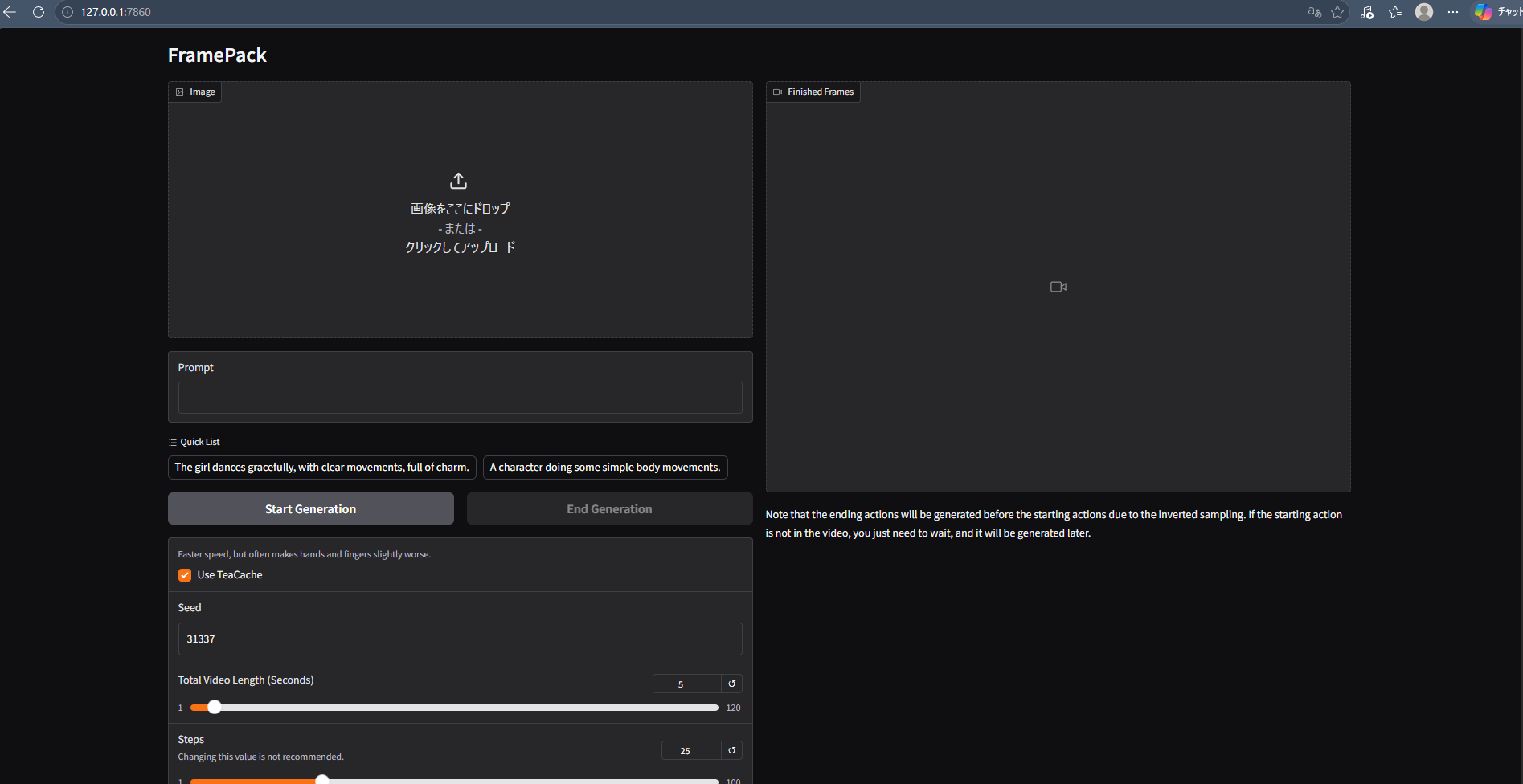
動画生成時に発生したCUDAエラーと対処
エラーの内容
GUIから動画を生成しようとしたところ、次のエラーが発生しました。
RuntimeError: CUDA error: no kernel image is available for execution on the device
同梱のPyTorch/CUDAとRTX 5080(Blackwell / sm_120)の互換性が原因と考え、今回はPyTorch 2.7.0 + CUDA 12.8へ更新しました。
エラーログ全文を表示
To create a public link, set `share=True` in `launch()`.
Unloaded DynamicSwap_LlamaModel as complete.
Unloaded CLIPTextModel as complete.
Unloaded SiglipVisionModel as complete.
Unloaded AutoencoderKLHunyuanVideo as complete.
Unloaded DynamicSwap_HunyuanVideoTransformer3DModelPacked as complete.
Loaded CLIPTextModel to cuda:0 as complete.
Traceback (most recent call last):
  File "C:\Users\test\OneDrive\Desktop\framepack_cu126_torch26\webui\demo_gradio.py", line 126, in worker
    llama_vec, clip_l_pooler = encode_prompt_conds(prompt, text_encoder, text_encoder_2, tokenizer, tokenizer_2)
  File "C:\Users\test\OneDrive\Desktop\framepack_cu126_torch26\system\python\lib\site-packages\torch\utils\_contextlib.py", line 116, in decorate_context
    return func(*args, **kwargs)
  File "C:\Users\test\OneDrive\Desktop\framepack_cu126_torch26\webui\diffusers_helper\hunyuan.py", line 31, in encode_prompt_conds
    llama_attention_length = int(llama_attention_mask.sum())
RuntimeError: CUDA error: no kernel image is available for execution on the device
CUDA kernel errors might be asynchronously reported at some other API call, so the stacktrace below might be incorrect.
For debugging consider passing CUDA_LAUNCH_BLOCKING=1
Compile with `TORCH_USE_CUDA_DSA` to enable device-side assertions.
PyTorchの更新
PowerShellでFramePackのフォルダへ移動し、同梱のPythonを使ってPyTorch関連のパッケージを入れ直します。以下のパスは、自分の解凍先に置き換えてください。
cd C:\Users\test\OneDrive\Desktop\framepack_cu126_torch26
.\system\python\python.exe -m pip uninstall torch torchvision torchaudio -y
.\system\python\python.exe -m pip install torch==2.7.0+cu128 torchvision==0.22.0+cu128 torchaudio==2.7.0+cu128 --index-url https://download.pytorch.org/whl/cu128
更新後の確認
次のコマンドで、PyTorchとCUDAのバージョン、認識されているGPUを確認します。
.\system\python\python.exe -c "import torch; print('Torch:',torch.__version__); print('CUDA:',torch.version.cuda); print('GPU:',torch.cuda.get_device_name(0)); print('Capability:',torch.cuda.get_device_capability(0))"
今回の環境では、次の結果になりました。
Torch: 2.7.0+cu128
CUDA: 12.8
GPU: NVIDIA GeForce RTX 5080
Capability: (12, 0)
動画生成を試す
動作のイメージと入力したプロンプト
プロンプトでは、次のような動きを指定しました。
正面を見る → 両手でスカートを摘む → 少し持ち上げる → ゆっくりお辞儀 → 顔を上げて微笑む → 元の姿勢
The girl looks directly at the camera with a playful smile.
She slowly tilts her head and gives a cute wink.
She gently brings her hand closer to her cheek while slightly swaying her upper body.
Her hair softly bounces with her movement.
Her bat wings gently flap once and then relax.
Her devil tail playfully sways behind her.
She subtly shifts her pose while maintaining eye contact with the camera.
Natural breathing, smooth subtle motion, stable face, consistent character design, fixed camera.
生成時間と結果
今回の環境では、5秒の動画を約10〜20分で生成できました。生成した動画がこちらです。
試してみた感想
少し意図した動作とは違うのと手の部分が不自然ですが、まずは動くことに感動!
今後、さらに生成の精度が高くなることにも期待しています。👍